1987 · Commodore · US · computer
Commodore Amiga 500
The 16-bit machine that made European home computing look like the future, three years before anyone else got there.
Also called A500
Essential Easy to run Needs a keyboard ▶ Watch on YouTube ↗
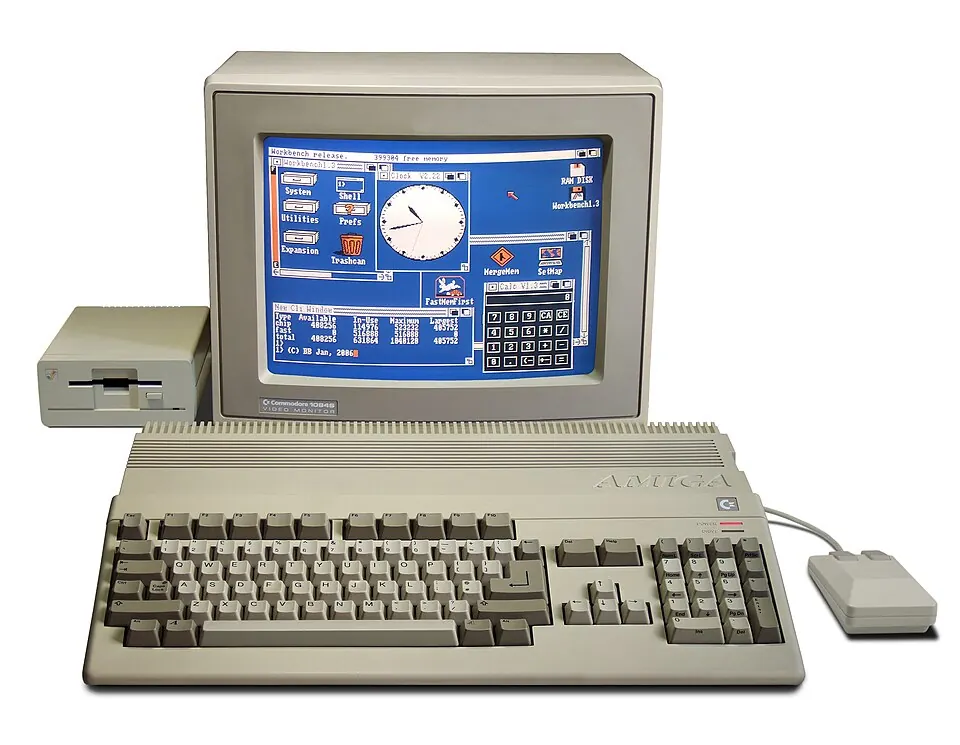
A home computer shaped like a chunky beige keyboard that, in 1987, did things PCs could not manage until the mid-nineties: thousands of colours on screen, four channels of sampled stereo sound, and arcade-smooth scrolling. In Europe it became the games machine of its generation. In America, where Commodore's marketing never quite landed, it mostly did not.
The trick was three custom chips nicknamed Agnus, Denise and Paula. They handled graphics, block-copying and sound on their own, without asking the main processor for permission. That is why a machine with a 7 MHz CPU could outrun contemporary PCs at games and video work — most of the labour was happening somewhere else on the motherboard.
It sold into ordinary households on the back of game bundles, and a generation of European developers learned their trade on it before moving on to consoles and PCs. Commodore, meanwhile, spent the early nineties failing to work out what came next, and went bankrupt in 1994.
Under the hood
- CPU
- Motorola 68000 — 7.09 (PAL) / 7.16 (NTSC) MHz
- Sound chip
- Paula — four channels of 8-bit sampled stereo
- Graphics
- OCS custom chipset — 32 on-screen colours from a palette of 4096, plus a 4096-colour HAM mode
- Memory
- 512 KB, very commonly expanded to 1 MB
- Media
- 880 KB 3.5-inch floppy disk
What it cost
about a quarter of a month’s pay in 1990 · about $958 today
| US launch list price ($699, machine only) |
$699 (1987)
about half a month’s pay · about $1,930 in today's money |
|---|---|
| Mass-market street price ($399 / £399 Screen Gems bundle) | $399 (1990) |
| UK launch price (£499) | £499 |
| Units sold | ≈6,000,000 estimate Over 6 million units sold, the undisputed champion of the Amiga line. |
The quoted price is the machine alone. US buyers still needed a monitor or an RF modulator to see anything.
What else cost that kind of money
- 19-inch colour television 1983 31%
- Basic VHS video recorder 1983 47%
Each bar is that item's price as a share of one month's average wage in its year. Benchmark prices are reconstructions, not transcribed catalogue line items. They were assembled from period trade press and catalogue reporting and every one is marked verified:false until it is checked against a dated scan. They are shown to give a sense of scale, not as precise figures. The wage series they are divided by, by contrast, is official SSA data.
Why it mattered
It made multimedia ordinary. Sampled sound, desktop video, and the demoscene all grew up on this machine, and the people who learned to program it went on to build a large part of the European games industry.
Regional differences
PAL machines run at 50 Hz with a taller display than NTSC ones. Because most Amiga software was written in Europe for PAL, NTSC emulation will crop or letterbox a great deal of it. Set your emulator to PAL unless a specific title demands otherwise — this is the single most common reason an Amiga game looks wrong.
Emulating it today
| Emulators | PUAE (libretro), FS-UAE, WinUAE, Amiberry |
|---|---|
| Setup effort | Easy to run (3 on this site's scale) |
| Controls | Games use a one-button Atari-style joystick, but you need the keyboard and mouse for the Workbench desktop, for loading things, and for most strategy and adventure titles. On a handheld you will want an on-screen keyboard mapped to a button before you start. |
| Runs on a handheld | Yes |
Amiga emulation is mature and accurate. The difficulty is never the emulator — it is the configuration. You have to tell it which Amiga you are pretending to be, give it the matching Kickstart file, and choose between raw floppy images and WHDLoad hard-disk installs. Get those three right and almost everything runs. Get the Kickstart wrong and you will see a black screen with no explanation, which is why this machine has a reputation for being difficult.
If some games boot and others show a black screen, suspect the Kickstart file before anything else.
Kickstart ROM
A Kickstart is the Amiga's operating system, burned onto a chip on the motherboard rather than loaded from disk. An emulator has no chip, so you hand it the chip's contents as a file — typically 256 KB or 512 KB. Without one the emulator shows an animated hand holding a floppy disk, and stops there.
How many files you need: 1. One file — Kickstart 1.3 — covers very nearly all A500 software. Add 2.0 if you also emulate an A600, and 3.1 if you intend to use WHDLoad, which generally assumes a later machine.
Where it stands legally: Kickstart ROMs are still under copyright. Cloanto sells licensed copies as part of Amiga Forever, which is the straightforward legal route; the alternative is extracting the ROM from an Amiga you own.
Legitimate source: Amiga Forever (Cloanto) — licensed Kickstart ROMs
Firmware details checked 2026-08. Emulator requirements change — see Libretro documentation — PUAE core for the current list.
Where the software is
TOSEC tries to preserve every version of every disk, including broken dumps, cracked releases and demos — excellent as an archive, unpleasant as a games folder. WHDLoad is a different thing entirely: a long-running community project that repackages floppy games as hard-disk installs which boot straight into the game with no disk swapping. If you want to play rather than to archive, WHDLoad is what you want.
Copyright: Commercial Amiga software remains in copyright, and a great deal of it is orphaned rather than free. The genuinely open material is the enormous public-domain and shareware scene that grew up around the Fish Disks and mail-order PD libraries, much of which was explicitly free to copy at the time and still is.
Genuinely free
- Fred Fish disks (Public domain / shareware) — Over a thousand curated disks of freely distributable Amiga software, assembled between 1986 and 1994.
This site names preservation projects and explains what they are. It does not link to ROM downloads.
Where to start
- Another World 1991 cinematic platformer
Rotoscoped polygons and no on-screen interface at all; it still looks deliberate rather than dated.
- Sensible Soccer 1992 sports
- Speedball 2: Brutal Deluxe 1990 sports
- Lemmings 1991 puzzle
- The Secret of Monkey Island 1990 adventure
- Turrican II 1991 run and gun
- Cannon Fodder 1993 action strategy
- Shadow of the Beast 1989 platformer
Famous for its parallax scrolling rather than for being good to play.
- Pinball Dreams 1992 pinball
- Alien Breed 1991 top-down shooter
- Sensible World of Soccer (SWOS) Top-down Sports
Fast, pinpoint ball physics and thousands of real-world teams in the greatest soccer sim ever made.
- The Chaos Engine Top-down Steampunk Shooter
Pick two mercenaries and blast through Victorian mechanical dystopias.
- Worms Turn-based Artillery Tactics
Team17’s party-game classic started right here on the Amiga.
The verdict
Still genuinely fun, but only after you have spent an evening learning what a Kickstart is and what WHDLoad does.
If what you want is to press a button and play something, start with a Mega Drive and come back to the Amiga later, when you are curious about why Europe loved it so much.
- Worth it if
- Anyone interested in the European side of games history, in the demoscene, or in what home computers could do before PCs caught up.
- Not for
- Anyone who wants a console experience with no configuration.
Scored 4/5 for fun today and 5/5 for historical importance. Those two scores decide the label at the top — a machine can matter enormously and still be no fun.
The rest of the family
The A600 (1992) is an A500 in a smaller case that needs Kickstart 2.0. The A2000, A3000 and A4000 were desktop machines aimed at professionals. None of them changed the games library enough to need a page of their own here — but the A1200, CD32 and CDTV did, and have one.
Read more & watch
- Emulation General Wiki — Amiga emulators
- Libretro — PUAE core setup
- Amiga 500 — Wikipedia
- ▶ YouTube: Watch Commodore Amiga 500 retrospectives, demos & reviews ↗
This page is 100% complete against the facts we try to record for every system. Gaps are shown as gaps.