1989 · Atari Corporation · US · handheld
Atari Lynx
Engineered by Epyx (creators of California Games) as the "Handy", Atari acquired the technology and released it months after Nintendo’s Game Boy.
Rewarding Easy to run ▶ Watch on YouTube ↗
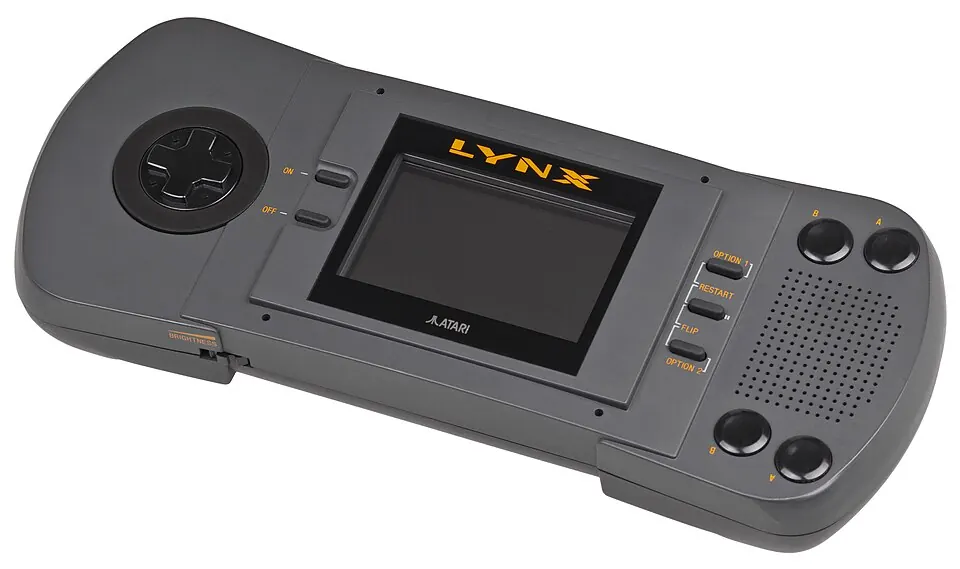
Engineered by Epyx (creators of California Games) as the "Handy", Atari acquired the technology and released it months after Nintendo’s Game Boy. While battery consumption was high on real hardware (6 AAs for 4 hours), emulation eliminates battery worries.
The Lynx featured real-time hardware sprite scaling years before the Super Nintendo, allowing 3D flight simulators like Blue Lightning to zoom terrain and enemy jets smoothly.
Under the hood
- CPU
- MOS 65SC02 @ 4.0 MHz (8-bit CPU with 16-bit address space) + "Suzy" 16-bit 16 MHz custom math/blitter chip
- Sound chip
- 4 hardware sound channels (8-bit DAC)
- Graphics
- 3.5" Backlit Color LCD (160 × 102), 4,096-color palette with real-time hardware sprite scaling, distortion, and zooming
- Media
- Curved-lip ROM Cartridges
What it cost
only about 6% of a month’s pay in 1991 · about $230 today
| US launch list price ($179.99 with California Games) |
$179.99 (1989)
only about 11% of a month’s pay · about $455 in today's money |
|---|---|
| Lynx II compact redesign price ($99.99) | $99.99 (1991) |
| Units sold | ≈3,000,000 estimate Approximately 3 million units. |
Why it mattered
The Lynx featured real-time hardware sprite scaling years before the Super Nintendo, allowing 3D flight simulators like Blue Lightning to zoom terrain and enemy jets smoothly.
Emulating it today
| Emulators | Handy, Beetle Lynx (libretro) |
|---|---|
| Setup effort | Easy to run (2 on this site's scale) |
| Controls | A standard modern controller covers the ordinary controls, though unusual accessories may need custom mapping. |
| Runs on a handheld | Yes |
Requires the `lynxboot.img` (512 bytes) BIOS file in the RetroArch system folder for Handy / Beetle Lynx cores. The emulator names above are starting points, not a promise that every title or accessory behaves identically. Computer platforms usually add model selection, disk handling and keyboard setup even when CPU emulation itself is mature.
system firmware or BIOS
Requires `lynxboot.img` (512 bytes, CRC32: `e4dec730`) in RetroArch system folder.
How many files you need: 1. Start with the firmware for the exact model and region you are emulating; some families need additional revisions for later models.
Where it stands legally: Firmware normally remains copyrighted. The clean route is to extract it from hardware you own unless the rights holder offers a download or licensed package.
Firmware details checked 2026-08. Emulator requirements change — see Libretro documentation for the current list.
Where the software is
Preservation catalogues describe verified dumps; they do not grant permission to download commercial software. A curated, correctly matched set is easier to use than an undifferentiated archive.
Copyright: Commercial software remains copyrighted unless its owner explicitly released or relicensed it. Homebrew, public-domain programs and current reissues should be treated separately from abandoned commercial titles.
This site names preservation projects and explains what they are. It does not link to ROM downloads.
Where to start
- Chip's Challenge Puzzle
Chuck Sommerville’s brilliant 148-level puzzle labyrinth.
- Blue Lightning 3D Afterburner-style Flight Action
Showcases the Suzy scaling chip zooming over mountain ridges and oceans.
- California Games Sports Action
BMX, surfing, and halfpipe with rich color audio on the go.
- Todd's Adventures in Slime World Action Exploration
Sprawling subterranean alien cavern mapping with water gun slime wash.
- Klax Puzzle
Tumble colored tiles down a conveyor belt into a 5x5 bin with digitized voice.
The verdict
The world’s first color handheld console. Custom hardware scaling and rotation chips (Suzy chip), reversible controls for left-handed players, and gems like Chip’s Challenge and Blue Lightning.
The strongest software can be rewarding, but original controls and setup assumptions may matter more than screenshots suggest.
- Worth it if
- Players curious about atari computers and handheld and willing to learn how the original machine worked.
- Not for
- Anyone who wants a large, instantly accessible library and no model, firmware or control decisions.
Scored 3/5 for fun today and 4/5 for historical importance. Those two scores decide the label at the top — a machine can matter enormously and still be no fun.
Read more & watch
This page is 75% complete against the facts we try to record for every system. Gaps are shown as gaps.